Date
This article explains how to create & work with a Date field.
Date field type is used to store date values. NocoDB supports a wide range of date formats, as detailed in the table below.
Create a date field
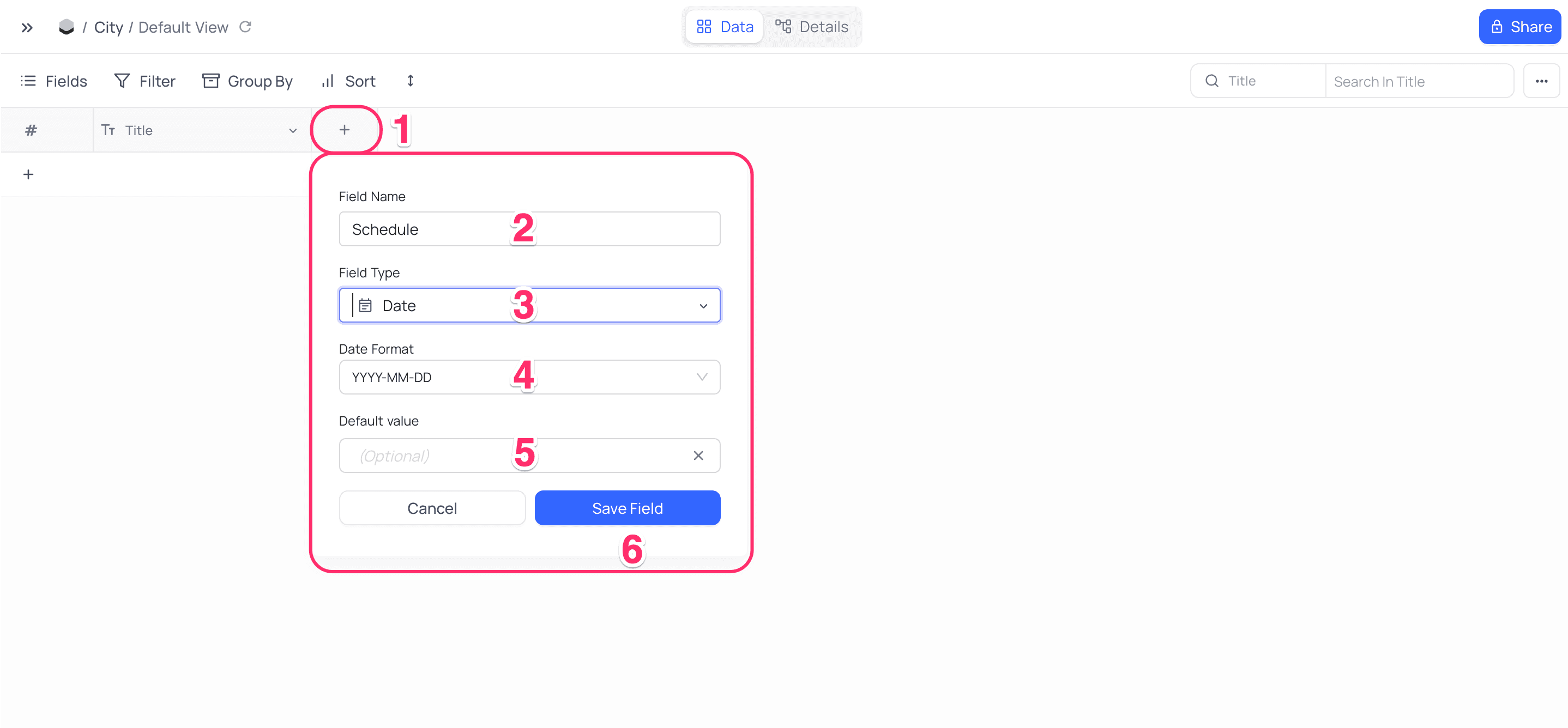
- Click on
+icon to the right ofFields header - On the dropdown modal, enter the field name (Optional).
- Select the field type as
Datefrom the dropdown. - Configure
Date Format - Configure default value (Optional)
- Click on
Save Fieldbutton.
Supported date formats
| Format | Example |
|---|---|
| YYYY-MM-DD | 2023-09-22 |
| dddd YYYY-MM-DD | Friday 2023-09-22 |
| ddd YYYY-MM-DD | Fri 2023-09-22 |
| YYYY/MM/DD | 2023/09/22 |
| DD-MM-YYYY | 22-09-2023 |
| MM-DD-YYYY | 09-22-2023 |
| DD/MM/YYYY | 22/09/2023 |
| dddd DD/MM/YYYY | Friday 22/09/2023 |
| ddd DD/MM/YYYY | Fri 22/09/2023 |
| MM/DD/YYYY | 09/22/2023 |
| dddd MM/DD/YYYY | Friday 09/22/2023 |
| ddd MM/DD/YYYY | Fri 09/22/2023 |
| DD MM YYYY | 22 09 2023 |
| MM DD YYYY | 09 22 2023 |
| YYYY MM DD | 2023 09 22 |
| DD MMM YYYY | 22 JAN 2024 |
| DD MMM YY | 22 JAN 24 |
| DD.MM.YYYY | 15.09.2024 |
| DD.MM.YY | 15.09.24 |
The
dddd (full weekday, e.g. Friday) and ddd (short weekday, e.g. Fri) variants prefix the day of the week to the date. The weekday prefix is display-only: it appears in cells and in grid group-by headers, while records still sort and group on the underlying date. The weekday name currently renders in English only.A date typed or pasted in an unpadded form, such as
5/5/2026 into an MM/DD/YYYY field, is accepted and normalised to the field's format. There is no need to enter leading zeros.Persian (Jalali) calendar
The Date Format dropdown also offers Jalali (Persian / Solar Hijri) formats. Selecting one displays and accepts dates in the Jalali calendar, and the date picker switches to the Persian calendar for that field.
| Format | Example |
|---|---|
| jYYYY/jMM/jDD | 1405/02/15 |
| jYYYY-jMM-jDD | 1405-02-15 |
| jDD/jMM/jYYYY | 15/02/1405 |
| jDD-jMM-jYYYY | 15-02-1405 |
| jDD jMMMM jYYYY | 15 Ordibehesht 1405 |
| jDD jMMM jYYYY | 15 Ord 1405 |
The Jalali calendar affects display and data entry only. Values are still stored as standard (Gregorian) dates, so sorting, filtering, formulas, and API responses are unchanged. This is chosen per field through the date format and is independent of the application language.