2026.07.0 : Introducing Calendar Sync & Image Annotations
Bring Google Calendar, Outlook, and CalDAV events into NocoDB with Calendar Sync, pin comments to any spot on an image, and work with richer formulas, lookups, and calendars.
Calendar Sync
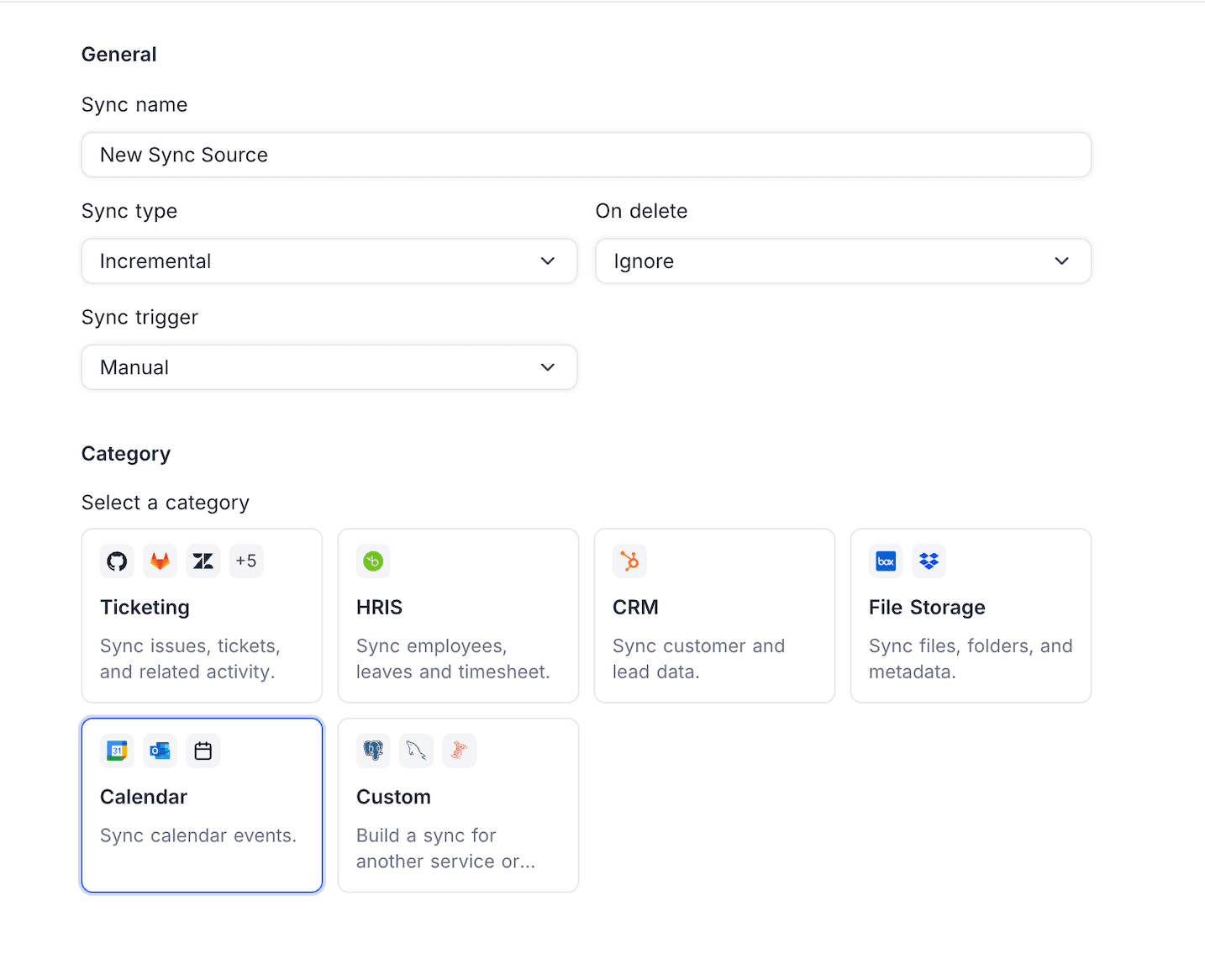
Calendar Sync brings events from Google Calendar, Outlook Calendar, or any CalDAV server (Apple iCloud, Fastmail, Nextcloud, and others) into NocoDB as a read-only Event table that stays up to date on its own. Pick a calendar and a date window from the new Calendar category in the App Sync wizard; NocoDB syncs the event details and sets up a colour-coded Calendar view on the first sync. Available on NocoDB Cloud (Plus plan and above) and licensed self-hosted deployments (Business plan and above).
Learn more about Calendar Sync →
Image Annotations
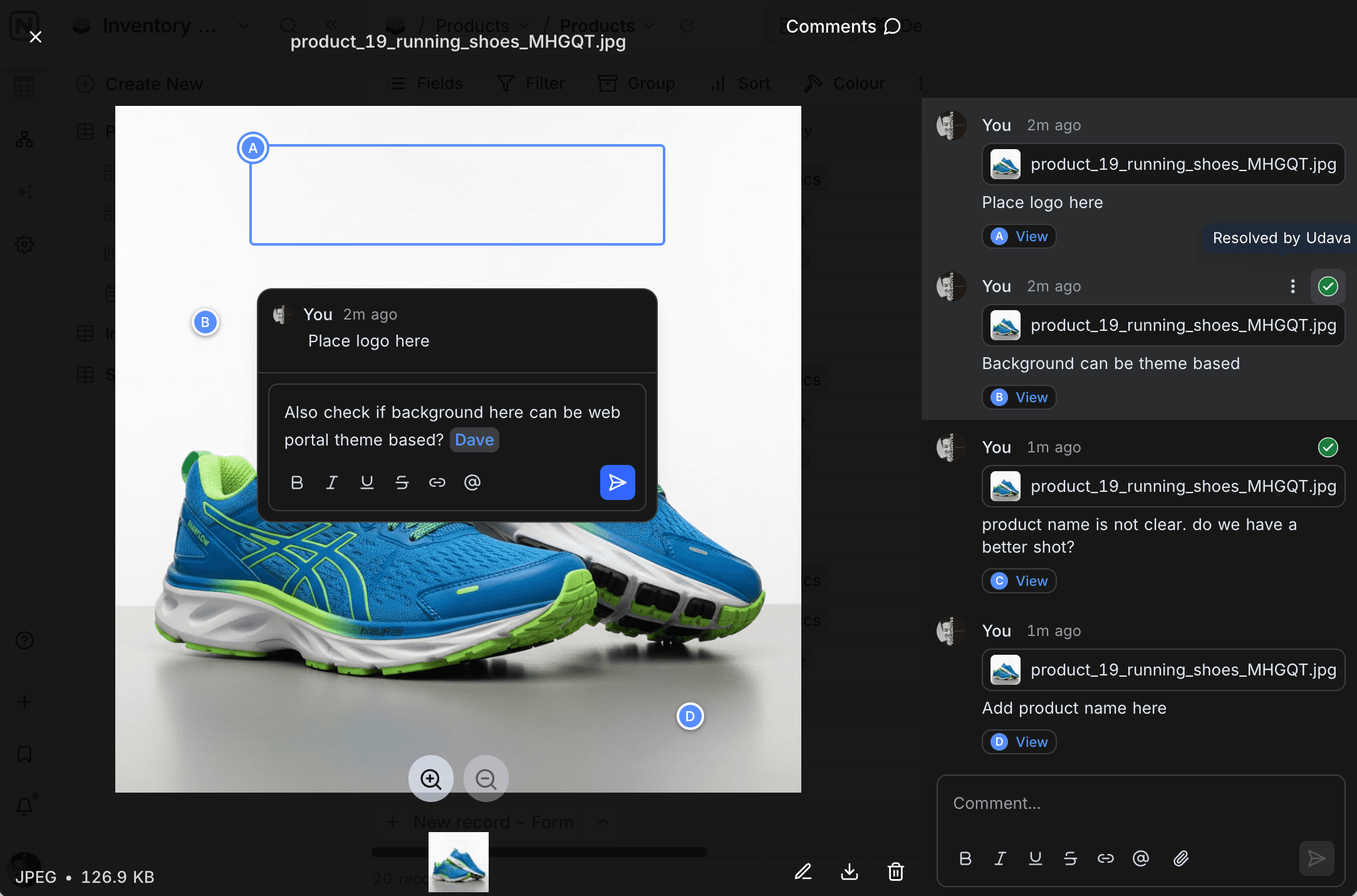
Image annotations let a comment point at an exact spot on an image instead of describing it in words. Open an image in the attachment viewer, drop a pin or drag a rectangle, and leave your comment; annotations are labelled, and replies thread underneath. Available on all NocoDB Cloud plans and licensed self-hosted deployments.
Workflow Comment Trigger
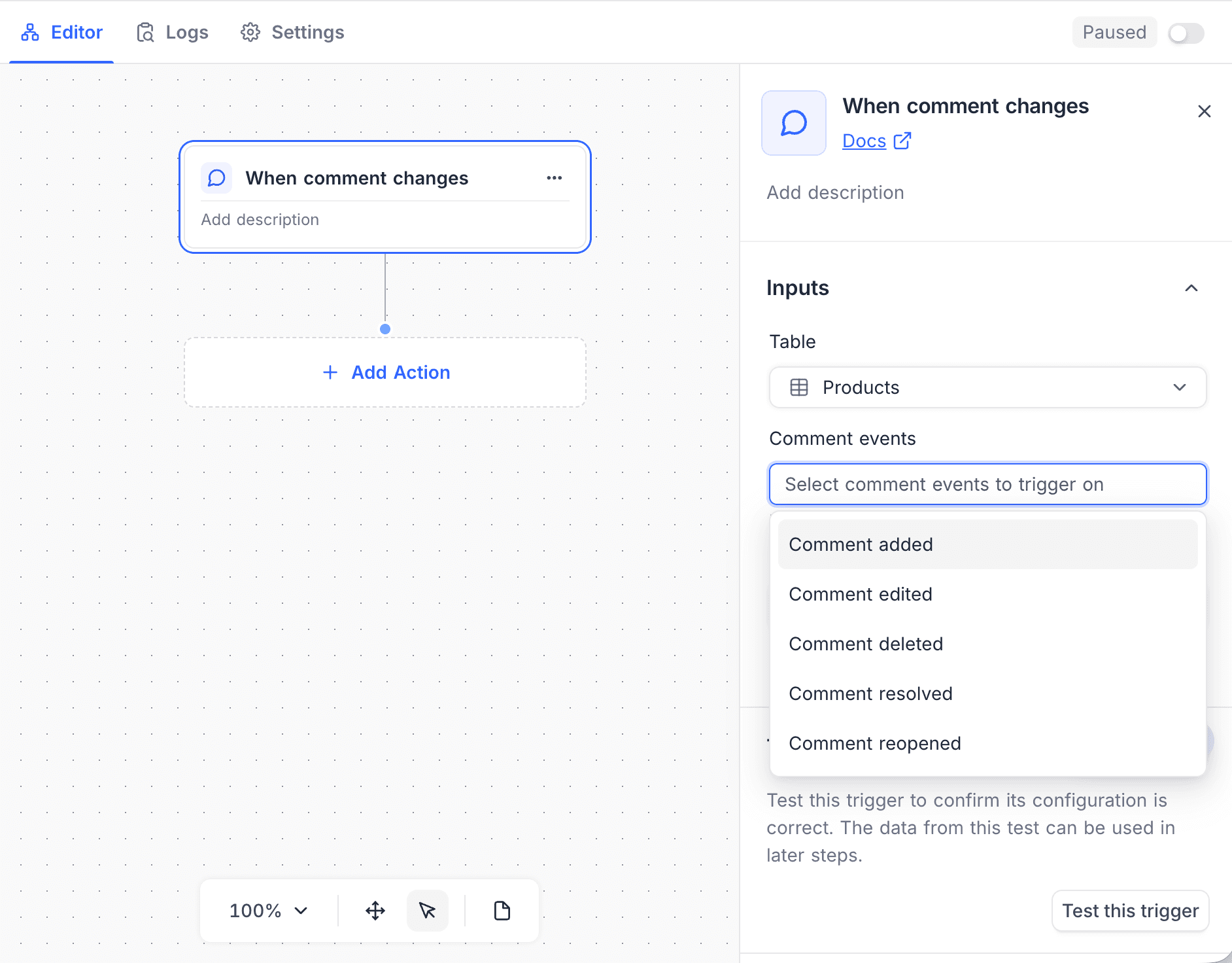
When comment changes is a new workflow trigger that runs a workflow when a comment is added, edited, deleted, resolved, or reopened on a record. Narrow it to specific comment events or to comments that mention particular people, and use the comment, its author, and mentions in later steps. Available on all NocoDB Cloud plans and licensed self-hosted deployments (Business plan and above).
Learn more about the comment trigger →
Improvements & Fixes
- Attach files to comments. Comments now take images and files, added from the file picker, pasted straight in, or dropped onto the composer. Available on NocoDB Cloud (Plus plan and above) and licensed self-hosted deployments (Business plan and above). Learn more →
- Trigger webhooks from comments. Webhooks can now fire when a comment is added, edited, deleted, resolved, or reopened, and can be narrowed to comments that mention a particular person or exclude comments posted by your own integrations. Learn more →
- Checksum formulas. New
MD5(),SHA256(), andSHA512()functions compute a hash of any value, useful for checksums and spotting changed records. Available on PostgreSQL and MySQL. Learn more → - Localized date formatting in formulas. A new
DATETIME_FORMAT()function formats a date or datetime into text, including the localizedLL,LLL, andLLLLpresets. Learn more → - Sort and limit Lookup values. A Lookup field can now sort the values it pulls in and show only the first or last few, instead of every linked value. Available on PostgreSQL, on NocoDB Cloud (Plus plan and above) and licensed self-hosted deployments (Business plan and above). Learn more →
- Persian (Jalali) calendar. Date and DateTime fields can display and accept dates in the Jalali calendar by picking one of the new Jalali date formats; values are still stored as standard dates underneath. Learn more →
- Export a calendar as .ics. Calendar views can be downloaded as an iCalendar (.ics) file and opened in any calendar app. Learn more →
- Custom calendar timescale. Alongside day, week, and month, calendars now offer a Custom mode that shows any number of days or weeks from one to six. Learn more →
- Event themes for calendars. Choose how event chips look with five themes, Bordered, Dot, Solid, Minimal, and Pill, set per view from the calendar toolbar. Available on NocoDB Cloud paid plans and licensed self-hosted deployments. Learn more →
- Calendar views on mobile. Calendar views now render and navigate properly on phones, with a compact toolbar and a record sidebar for busy days.
- Skip sheets when importing Excel. Multi-sheet workbooks now let you untick the sheets you don't want before importing, rather than importing everything and cleaning up after.
- Create new fields while importing. When importing into an existing table, unmatched columns can be mapped to a brand new field instead of only to existing fields or dropped.
- Longer comments. The comment length limit was raised from 3,000 to 10,000 characters.
- Lookup fields as form conditions. A form field's "Show on conditions" rule can now be driven by a Lookup field, so a question can appear based on data from the linked record the respondent picks. Learn more →
- Field descriptions in the expanded record. Fields with a description now show an info icon in the expanded record and in shared views; hover it to read the description.
- Unpadded dates are no longer dropped. Typing or pasting a date like
5/5/2026into aMM/DD/YYYYfield is now accepted and normalised, where before it was silently discarded and could clear an existing value. - Alphabetized multi-select values. With "Alphabetize" enabled, the values stored in a Multi Select cell are now kept in alphabetical order, not just the option list. Existing records are re-sorted the next time they are saved.
Security
- Network access. Tighter controls over how NocoDB connects to external resources.
- Data access controls. Reinforced protections that keep information visible only to those authorised to see it.
- Input handling. More robust validation throughout the platform.
Self-Hosting
- On-prem plans resolve from the license itself. The plan for a self-hosted deployment is now derived from the signed license type rather than optional metadata, so each install gets exactly the tier it is licensed for. Deployments activated through a marketplace, an admin-issued key, or a legacy key without that metadata could previously fall back to Enterprise features they were not licensed for and will now resolve to their actual plan. Expired legacy Enterprise trial licenses no longer grant Enterprise features. This release ships a database migration to record the license type on existing plans.
- Expired trials no longer lock you out. When an Enterprise trial expires, the instance now falls back to Community behaviour with paid features gated, instead of covering the interface with a full-screen blocking overlay.
- Email and password sign-up alongside SSO. With "Allow email & password sign-in alongside SSO" enabled, invited users can now set a password from the sign-up page, not just the sign-in page.
- Lighter image processing. Attachment dimensions are now read straight from image headers instead of decoding the full image, so uploads are quicker and gentler on the server.
- New configuration options.
NC_ALLOW_LOCAL_DATA_IMPORTopts in to importing from local or private hosts, and a set ofNC_AI_*options tune the AI chat's record and token budgets. Learn more → - Reliability improvements. Permanently deleting records now handles formula and link fields whose configuration was already cleaned up, and an unreachable external data source no longer floods the logs while re-validating formulas.
Availability
| Feature | CE / Free | Paid / Enterprise |
|---|---|---|
| Calendar Sync | – | ✅ |
| Image Annotations | – | ✅ |
| Workflow Comment Trigger | – | ✅ |
Deprecation Notice
As announced in 2026.06.1, this release no longer publishes pre-built executables. If you currently run NocoDB from an executable, switch to Docker or another supported installation method to keep receiving updates.